UK Sponsor Register Explained: What It Does and Doesn't Show
The GOV.UK register of licensed sponsors: what every field means, and the three things it cannot tell you.
Quick answer
The UK sponsor register (officially the Register of Licensed Sponsors: Workers) is the Home Office's list of organisations permitted to sponsor workers on UK visa routes. Each entry shows a legal name, town, rating, and the routes the licence covers. It is one of the most useful public documents in a UK job search — but it does not show sponsorship history, hiring intent, or whether an employer will sponsor you.
Key takeaways
- The register is official, free, and public. It lists 127,672 organisations
as of 11 August 2026.
- Entries use legal names, so brand names on job ads need matching, not exact
copying.
- An A rating is a full licence; a B rating means the sponsor is on a Home
Office action plan.
- The register does not publish per-company sponsorship history.
- "Not on the register" is not the same as "will never sponsor".
What the register actually is
The official source
The Home Office publishes the Register of Licensed Sponsors: Workers on GOV.UK Source: GOV.UK — Register of licensed sponsors: workers. It covers organisations licensed to sponsor on the Worker and Temporary Worker routes, which include the Skilled Worker route, the Health and Care Worker route, and several others.
The register is updated on a rolling basis. The GOV.UK page for the register shows a record of updates; the most recent at the time of writing was 5 August 2026. What you see today may be different next week.
What a licence means in law
A licence is a permission document. It allows an organisation to assign certificates of sponsorship (CoS) for eligible roles. It does not create an obligation to sponsor anyone. GOV.UK's employer guidance is clear that a sponsor must assign a CoS for a genuine role that meets the immigration requirements Source: GOV.UK — Sponsor a Skilled Worker.
What a licence does not mean
The register says nothing about:
- How many people the organisation has sponsored.
- Whether it sponsors junior, senior, or any roles.
- Whether it will sponsor you.
- Whether its licence is currently under investigation.
These are the gaps every sponsor checker has to admit. Good checking follows a "never overclaim" rule: confirmed, probable, worth checking, and not on the register are four different answers.
What each field means
The entry, decoded
| Field | What it contains | What it means for you |
|---|---|---|
| Legal name | The registered company or organisation name | Match this, not the ad's brand name |
| Town | The licence address town | Where the sponsor is based, not where the job is |
| County | Administrative county | Helps disambiguate same-name firms |
| Rating | A or B (plus premium/SME variants) | B means an action plan is in place |
| Routes | Licence types, e.g. Skilled Worker | Confirms which visa routes are covered |
Legal name vs trading name
This is the field that causes the most false "not on the register" results. Job ads show trading names: "Marks and Spencer", "Tesco", "Barclays". The register shows legal names: "Marks and Spencer plc", "Tesco Stores Ltd", "Barclays Bank UK PLC".
When you check an employer:
- Copy the exact name from the ad.
- If nothing matches, try the legal name.
- If a checker shows close matches, read them before deciding.
A good checker shows you the candidates when names are not identical, instead of guessing for you.
Ratings: A, B, and the variants
An A rating is a full licence. The sponsor can assign certificates of sponsorship within the limits of its licence.
A B rating means the Home Office has found compliance problems and placed the sponsor on an action plan. While on a B rating, the sponsor generally cannot assign new certificates until the issues are resolved Source: GOV.UK — Workers and Temporary Workers: guidance for sponsors, part 3.
The register also carries variants like "A (Premium)" and "A (SME+)" — these describe the sponsor's service tier, not extra permission for you.
For a job seeker, a B rating is a caution sign: the employer is under supervision right now. It is worth asking about in the interview, and it is worth checking again before you accept an offer.
How often it updates and why that matters
A moving document
The register changes constantly. Licences are granted, suspended, revoked, and renewed. The GOV.UK page shows a long update history, and the Home Office refreshes the underlying data on a schedule. The register you checked last month may not be the register today.
What this means for your search
- An employer absent from the register today may have applied for a licence
that arrives next month.
- An employer on the register today may lose its licence later.
- Any tool that checks the register is only as fresh as its copy of the data.
A reputable tool states its data version and how often it refreshes. If it cannot say when its copy was built, treat its answers with caution.
What the register does not show
No per-company sponsorship history
A common misconception is that the register (or some dataset behind it) records which companies have sponsored which workers. It does not. The Home Office publishes aggregate sponsorship data quarterly, not per-company history Source: GOV.UK — Immigration system statistics.
Tools that claim to show "how many visas this company has sponsored" are inferring it from something else — often from job ads, LinkedIn profiles, or guesses. Treat those numbers as estimates with no official basis.
No hiring intent
A licence does not mean the organisation is hiring, hiring internationally, or hiring your role. You still need the job ad, the salary, and the employer's own words.
No visibility into applications
The register cannot tell you how many people applied, what the employer decided, or why. Nothing public can.
A worked example: why two lookups disagree
The company names below are invented for illustration.
You check "Brightpath People" on a job ad. The checker says "not on the register". You check again on the GOV.UK file, searching "Brightpath". Still nothing. Then you search "Brightpath People Ltd" — the entry is there: A rating, Skilled Worker route, London.
What happened? The ad used the trading name, the register uses the legal name, and your first two searches used the trading name too. The checker was not wrong in a mysterious way; it was matching exactly what you typed.
This is a common cause of a false "not on the register". Whenever a result surprises you, try the legal name before drawing a conclusion. Companies House is the free official way to find it Source: GOV.UK — Find and update company information.
The register vs other company data sources
How they differ
| Source | What it shows | What it cannot show |
|---|---|---|
| Register of licensed sponsors | Who may sponsor, on which routes, at what rating | Hiring intent, sponsorship history |
| Companies House | Legal names, company status, accounts | Anything about sponsorship |
| Home Office quarterly statistics | Aggregate grant volumes by route | Which company sponsored whom |
| Job ads and LinkedIn | What employers say about themselves | Verified sponsorship status |
The pattern to remember: only the register answers "is this employer permitted to sponsor?", and nothing answers "will they sponsor me?". Tools that claim the second are selling inference, not data.
How to keep a watchlist
Why watch, not discard
The register changes every week. Employers gain licences, lose them, and regain them. A watchlist turns the register into a live research tool instead of a one-off lookup.
The method
- Keep a list of employers you are interested in.
- Check each one against the register monthly, and again before applying.
- Note the data date of whatever copy you checked.
- Record rating changes — a B rating resolving to A matters.
- Delete employers that repeatedly show no licence and no hiring activity.
Keep the list in any spreadsheet or notes app you will actually update. The habit matters, not the tool.
How to read the register file directly
The practical method
The GOV.UK page offers the register as a downloadable file. For a one-off lookup the file is overkill, but it is the authoritative source, so knowing how to use it matters:
- Download the latest file from the register page.
- Open it in a spreadsheet program.
- Use the filter or search for the legal name you are checking.
- Read the rating and route columns for the matching row.
- Note the file's date in your records.
When the file is the right tool
- Verifying a result another tool reported.
- Checking every entry for a family of companies.
- Auditing a shortlist before a big decision, such as accepting an offer.
When it is the wrong tool
- Checking one ad while you are mid-search — an extension or search site is
faster.
- Building a sector or city shortlist — the file has no filters; a search
site does.
The right method is the one that gets you the same answer fastest without losing accuracy. The register is the same data everywhere; only the interface differs.
Searching the register by route
The file has a route column for a reason. If you are targeting Skilled Worker roles, filter for entries that list Skilled Worker before you worry about anything else. An employer licensed only for a Temporary Worker route may not be able to sponsor the permanent role you want. Reading the route field first saves you from celebrating the wrong row.
The same logic applies to ratings: sort A-rated entries first when building a shortlist, and keep B-rated employers in a separate review list. A B rating is not a discard — it is a question to ask.
Why "not on the register" is not a verdict
Four reasons a match fails
- The ad uses a trading name and the register uses the legal name.
- The organisation is new and its licence was granted after your copy of
the data was built.
- The employer does not hold a licence yet.
- The checker made an error.
Only the third reason means "cannot sponsor today". The other three are reasons to check again, not to give up.
The honest answers a good checker gives
A well-built checker returns three states on a job page:
- Licensed sponsor — the employer name matches a register entry.
- Probably licensed — close entries exist; the panel lists them.
- Not on the register — nothing matched.
It deliberately does not say "will not sponsor", because the register cannot support that claim. That restraint is the whole point of using an official source.
How to check an employer in practice
The three free routes
| Method | Effort | Best for |
|---|---|---|
| GOV.UK spreadsheet | High — download and search a large file | One-off deep dives |
| Register search site | Low — filters by route, sector, location | Building a shortlist |
| Checker extension | Lowest — verdict on the job page | Day-to-day searching |
A short workflow
- See a job ad.
- Check the employer name against the register.
- If licensed, read the ad for salary and sponsorship wording.
- If probably licensed, look at the close matches yourself.
- If not on the register, try the legal name, then move on or watchlist.
The register lookup is free everywhere. No paid tool adds data to the register; paid features add convenience, like checking the ad itself.
The bottom line
The UK sponsor register is the ground truth for one question: is this employer permitted to sponsor? It answers that question well, quickly, and free. It cannot answer whether the employer will sponsor you — nothing public can. Use the register to shortlist employers, use the job ad to check salary and wording, and use a regulated adviser for anything that touches your own visa case. A checker extension makes the first step instant: it reads the job page you are already on and matches the employer against the register on your own machine, with no account and no daily limit.
Frequently asked questions
What is the UK sponsor register?
It is the Home Office's official list of organisations licensed to sponsor workers on UK visa routes. It is published on GOV.UK and updated regularly.
How many companies are on the sponsor register?
More than 125,000 organisations. The register contains 127,672 organisations as of 11 August 2026, built from the GOV.UK file.
Does being on the register mean a company sponsors visas?
It means the company is permitted to sponsor. Whether it sponsors a specific role or candidate is a separate decision that the register cannot show.
What is the difference between an A and B rated sponsor?
An A rating is a full licence. A B rating means the sponsor is on a Home Office action plan and generally cannot assign new certificates of sponsorship until the plan is resolved.
Can I search the register for free?
Yes. The GOV.UK file is free, register search sites are free, and checker extensions offer free lookups. Nobody needs to charge you for the register itself.
Why does the register show a different company name than the job ad?
The register uses legal names. Job ads usually use trading names. Always try the legal name before concluding an employer is not licensed.
Does the register show how many visas a company has sponsored?
No. The Home Office publishes aggregate sponsorship data, not per-company history. Tools claiming otherwise are estimating.
What happens if an employer's licence is revoked?
Their ability to sponsor ends or is restricted. The register updates to reflect this. If you already hold a visa and your sponsor loses its licence, the outcome depends on UKVI — that is a question for GOV.UK or a regulated adviser, not a checklist.
Is the register the same as a list of companies hiring foreigners?
No. It is a list of organisations permitted to sponsor. Many licensed organisations hire only UK-based staff for most roles; some hire internationally often. The register does not tell you which.
Why does my search show the company twice?
Many organisations hold more than one licence — Worker and Temporary Worker, or multiple routes. Each row is a separate licence entry. Read the route field to find the one relevant to your application.
Can an employer sponsor me while their licence is suspended?
No — a suspension pauses sponsorship activity. Check the register and, if you hold or are relying on a licence, speak to the employer and a regulated adviser about what it means for you.
How do I know the register version a tool uses?
Reputable tools state it. A good checker shows the register version and its refresh schedule. If a tool will not say when its data was built, treat its "not on the register" answers with caution.
Are there registers for other routes too?
Yes. The Home Office publishes separate register pages for different licence types. The workers register covers Worker and Temporary Worker routes — the ones that matter for most job seekers. Check the page title before you use any register file.
Does the register show employers that lost their licence?
No. It shows current licences. When a licence is revoked or suspended, the entry is removed or updated. If you need to know why a licence ended, that is a question for the employer and, where relevant, a regulated adviser.
Why does the register show employers I have never heard of?
Because the register covers every licensed organisation in the country — NHS trusts, universities, charities, manufacturers, and thousands of small businesses — not just the brands you see in job feeds. That breadth is the point: it is the complete set of organisations permitted to sponsor, not a curated list.
Can I search the register by sector or location?
The raw file has town and county fields, and free register search sites add sector and route filters on top. Sector labels are not part of the official file, so tools add their own classification — use them as a shortcut, and confirm with the entry's route field.
Last reviewed 2026-08-06 by UK Sponsor Guide Editorial Team. Figures on this page are checked against GOV.UK on the review date. Rules, fees, and salary floors change — always confirm against GOV.UK before you act. Spotted an error?
Check the employer without leaving the job advert
- See the legal sponsor name, town, routes, rating, and close matches on the page.
- Your checks and job-page text stay on your computer; the extension makes no network requests.
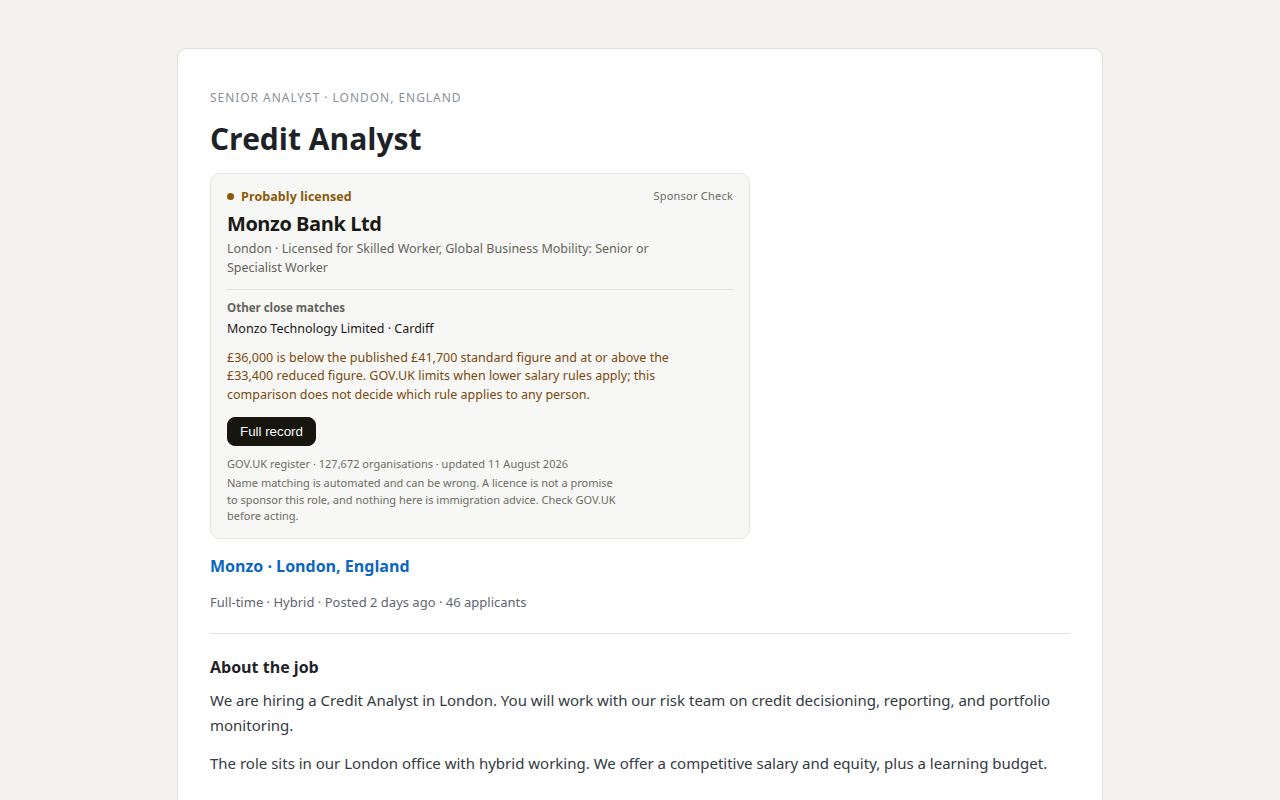
Our product. Sponsor Check is the browser extension sold by THINKINGAI LIMITED, the company identified in this site's footer. The register itself remains free, official, and public. This site is information only, not immigration advice.