How to Keep a UK Sponsor Watchlist
A manual, register-based system for tracking UK employers you may want to apply to, and the honest limits of watching the sponsor list.
Quick answer
A sponsor watchlist is a dated record of employers you are interested in, checked against the official Register of Licensed Sponsors: Workers. Keep a short list of the organisation names shown in the register, check each one against the current file, and log the date, rating, and routes shown. The current file does not preserve each employer's earlier entries, so your notes let you compare what you saw on different dates. They cannot explain why an entry changed or tell you whether an employer will sponsor you.
Key takeaways
- A watchlist is a habit and a record. A spreadsheet, notes file, or paper list
you actually update can work.
- The current register file is a snapshot. A dated log lets you compare your
own checks over time.
- Check an employer when you add it, then re-check when the information matters
to a live application.
- Record the organisation name shown in the register, which may differ from the
brand name in a job advert.
- Note the date of the register file you checked; "on the register" is always
a statement about a file on a date.
- A licence is permission to sponsor, not a promise to sponsor any role or any
person.
What a sponsor watchlist is for
The problem a watchlist solves
The Register of Licensed Sponsors: Workers is updated frequently. If you check an employer only once, you may be relying on an older snapshot by the time the information matters to an application.
A watchlist turns that single snapshot into a sequence. Instead of asking "is this employer on the register?", the useful question becomes "is this employer on the register today, and has anything changed since I last looked?". The current file does not include a per-employer change log. Comparing your own dated notes can show that the displayed entry changed between your checks, but not why it changed or exactly when.
What it is not
A watchlist is not a promise tracker. It cannot tell you an employer will sponsor you, pay you enough, or open a relevant role. It cannot predict what a rating will show next. It is simply a way to record what the official file showed when you checked it.
Why the register is the foundation
The official source and what it holds
The Home Office publishes the Register of Licensed Sponsors: Workers on GOV.UK Source: GOV.UK — Register of licensed sponsors: workers. It lists organisations licensed to sponsor on the Worker and Temporary Worker routes, with each entry showing the organisation name, town or city, county, licence type and rating, and the routes covered. The register also shows a record of when its data was most recently updated.
Three details shape everything a watchlist can do:
- Organisation names may differ from the brands used in adverts.
- The file is a snapshot with no history.
- A row is permission, not intention.
If those three read like things you already know, good — they are the same three facts that drive our guide to the sponsor register.
Legal names, not brands
The register identifies the organisation recorded on the sponsor licence, which may not be the brand displayed in a job advert. If you only have a brand name, Companies House may help you identify possible legal entities. Treat that as a clue rather than proof: a group can contain several entities, and you still need to match the organisation responsible for the vacancy to the register entry.
The core method: a register-based workflow
Step 1: build the raw list
Write down every employer you are genuinely interested in applying to. Aim for a manageable number — dozens, not hundreds. You will update it as you learn, so it does not need to be perfect on day one.
For each entry, record three things:
| Column | What goes in it |
|---|---|
| Employer (legal name) | The name as it would appear on the register |
| Why I am interested | One line: sector, location, a role I saw |
| Last checked | The date of your most recent register check |
No special software is needed. A spreadsheet, a notes file, or even a paper list updated on a fixed day can work. What matters is that you update the same record consistently.
Step 2: check each employer against the register
For each employer on the list, do a register lookup:
- Take the legal name.
- Search the register for one distinctive word from that name.
- Read the row: name, town, rating, and the routes covered.
- Write down the rating and the routes in your "last checked" note.
Remember a licence covers specific routes. An entry listing only Temporary Worker routes does not mean the employer can sponsor a Skilled Worker role for you. Read the route field, not just the fact that a row exists.
Step 3: log the date and what changed
The register updates frequently. When you check, record the file's date and your result. Over time those notes let you see:
- A rating move from B to A, or A to B.
- A route appearing or disappearing from the entry.
- An employer dropping off the register entirely between your checks.
A difference between two checks is useful information, provided you describe it carefully: it proves only that the entries you saw on those dates differed.
Step 4: re-check on a schedule
Set a rhythm that matches how fast you move in your search. Useful triggers can include:
- When you shortlist an employer — establish a dated starting point.
- Periodically for employers you continue to follow.
- Before a big step — before a technical test, a panel day, or booking
travel for an interview.
The register data can go stale between any two of your checks. The longer the gap, the more of the value you lose.
The limits of a watchlist
What the register cannot show
A watchlist built on the register inherits every limit of the register itself:
- No per-employer history in the file. Your dated notes record only the
checks you made; they are not a complete official history.
- No hiring intent. A licence says an employer is permitted to sponsor. It
says nothing about whether it will sponsor you, any role, or anyone.
- No visibility into your application. Nothing public tells you how many
people applied, what the employer decided, or why.
- No explanation for every change. The file shows the published entry; it
is not a narrative of the circumstances behind that entry.
The mistakes a watchlist cannot prevent
Be clear-eyed about what the system does not guard against:
- An employer that is on the register but will not sponsor your role.
- An application you send that is never read.
- A salary that does not clear the route's requirements for your situation.
A watchlist improves the quality of your list. It does not substitute for reading the job ad, checking salary, or asking the employer directly.
A worked example
The organisations below are invented for illustration.
Say you are interested in a health-tech company you saw mentioned as "Meridian Cloud". Your watchlist row reads:
| Employer (legal name) | Why I am interested | Last checked |
|---|---|---|
| Meridian Cloud Systems Ltd | Health-tech, remote-friendly, saw a role | 14 June |
On 14 June you search the register for "Meridian" and find one row: Meridian Cloud Systems Ltd, Manchester, A rating, Skilled Worker route. You write "A rating, Skilled Worker, 14 June" in the notes.
On 12 July, before applying to a new advert from the same company, you check again. The row still exists, still A rated, still Skilled Worker. You update the date. You now have a record of what the file showed on both check dates, rather than relying on memory.
Without those notes, you might later be asking "didn't they have a licence?" A watchlist answers only what the file showed on the dates you recorded.
Record uncertainty explicitly
Not every lookup produces a clean match. Add a short status such as "exact match", "possible group entity", or "not found under the names checked". Keep the search terms beside that status. This prevents an uncertain name match from quietly turning into a confident claim when you revisit the row later.
Common errors and how to fix them
| Error | Result | Fix |
|---|---|---|
| Building the list from brand names | False "missing from register" results | Add the legal name, found via Companies House |
| Checking every employer once, then never again | Stale decisions | Set a fixed re-check day |
| Listing fifty employers you do not care about | The list is abandoned | Keep it short and current |
| Noting "on the register" without the date | Useless when reviewed later | Always add the file's date |
| Guessing what a B rating means | Acting on an assumption | Read the current GOV.UK licence-rating guidance and record only what it supports |
| Expecting the watchlist to show intent | Disappointment | Remember it shows status, not intention |
Building the habit
Pick a fixed ritual
A watchlist that is checked "sometime" is checked roughly never. Anchor it to a routine you already have — every Friday, the first of the month, or the day after you send a round of applications. A small, scheduled habit beats an ambitious one that never happens.
Keep the list somewhere you glance at anyway, such as the same file as your application tracker. If the list is buried in a folder you never open, you will not use it.
Keep it lean
A bloated watchlist loses its usefulness. Revisit it periodically and remove employers that:
- show no licence across several checks, and
- no longer interest you.
A focused set of genuinely interesting employers is easier to maintain than a long list that receives only a cursory look.
When to override the schedule
Re-check out of band whenever something about the employer changes: a new advert, a funding announcement, an acquisition, or an interview invitation. The schedule is a floor, not a ceiling.
Connecting the watchlist to the rest of your search
The employer check is one of three tests
A register row helps answer whether the named organisation is listed for a particular route. It does not establish that a vacancy or a person meets the current requirements. Check the role, occupation, pay, and your circumstances against the current GOV.UK route guidance Source: GOV.UK — Skilled Worker visa: your job. A licence is only the employer-side starting point.
When an employer is missing from the register
If a name is absent, first check whether you searched the organisation named in the vacancy, tried plausible group entities, and noted the date of the file. Our guide to employers that appear to be missing from the register walks through common naming and entity mismatches. Describe the result narrowly: the entity and route you searched did not appear in the file you checked. Do not turn that snapshot into a claim about another entity or a future application.
Building the list of names in the first place
The watchlist is only as good as the employers you put on it. Start with names from your sector and location research, then use the register to check each organisation and the routes shown. Our guide to companies in the UK that sponsor visas shows how to turn the register into a shortlist of employers rather than a list of adverts.
The bottom line
A sponsor watchlist is a simple, repeatable system: keep a short list of legal names, check each against the current register file on a schedule, and log the date and rating every time. It works because the register has no history and your dated notes are the only way to see changes. It is deliberately limited — it shows a published entry, not intention, and it cannot promise sponsorship any more than a licence can. Use the list to organise the employer research, and use a regulated immigration adviser for anything about your own visa case.
This page is information, not immigration advice. This site is not affiliated with the Home Office or GOV.UK. A sponsor licence is permission to sponsor, not a promise to sponsor any role or any person. For your own circumstances, check GOV.UK or speak to an adviser registered with the Immigration Advice Authority or a regulated solicitor.
Frequently asked questions
What is a sponsor watchlist?
A dated record of employers you are interested in, checked against the Register of Licensed Sponsors: Workers on a schedule, so you can see when an employer's licence status changes and avoid deciding on stale data.
Why keep a watchlist instead of checking once?
Because the register is updated frequently. A single check is a snapshot; a watchlist lets you compare the results of your own dated checks over time.
Does the register record sponsorship history?
No. The current file has no per-employer history column. Your notes preserve only what you personally observed on the dates you checked; they are not an official or complete history.
What do I write down when I check an employer?
The employer's legal name, the date you checked, the register file's date, and what the row said: rating and the routes covered.
Should I use a spreadsheet or an app?
Either, or neither. The habit matters, not the tool. Use whatever you will actually update, even a notes file.
How often should I re-check employers?
Choose a cadence you will maintain, and re-check when the information matters to a live application — particularly before a step that costs meaningful time or money. A watchlist is a reminder system, not a legal deadline.
What does a B rating mean on my watchlist?
It indicates a current restriction with consequences set out in the GOV.UK licence-rating guidance. Record the rating and check that guidance rather than inferring the cause, likely duration, or outcome.
Why does the register show a different name from the job ad?
The organisation name in the register may differ from the trading or brand name in an advert. Use Companies House as one source of entity clues, then match the vacancy to the organisation that would employ you before recording a result.
Can a watchlist tell me if an employer will sponsor me?
No. A licence is permission to sponsor, not a promise to sponsor any role or any person. A watchlist shows status on a date; nothing public shows intention.
What if an employer disappears from the register between my checks?
Note the date and the last rating you saw. The file does not say why the entry ended, so record what you know and treat the change as a prompt to ask — or, if you rely on a licence, to speak to the employer and a regulated adviser.
What if a group has several UK companies?
Match the vacancy to the entity that would employ you. A parent, subsidiary, and trading brand are not interchangeable merely because they share a group name. If the advert is unclear, ask the employer which legal entity is hiring before drawing a conclusion from the register.
How many employers should be on the list?
Enough to be useful and few enough to maintain. The right size depends on your sector, location, and available time; a list you can check consistently is more useful than an arbitrary target.
Should I watch employers without a licence?
You can keep an employer of interest on the list, but mark the result narrowly: the entity and route searched were not found in the dated file. Do not assume a future licence, a timetable, or that another group entity covers the vacancy.
Is keeping a watchlist free?
Yes. GOV.UK makes the register available to view and download without charge. You can keep the watchlist in a spreadsheet, notes file, or paper record you control.
Last reviewed 2026-08-09 by UK Sponsor Guide Editorial Team. Figures on this page are checked against GOV.UK on the review date. Rules, fees, and salary floors change — always confirm against GOV.UK before you act. Spotted an error?
Check the employer without leaving the job advert
- See the legal sponsor name, town, routes, rating, and close matches on the page.
- Your checks and job-page text stay on your computer; the extension makes no network requests.
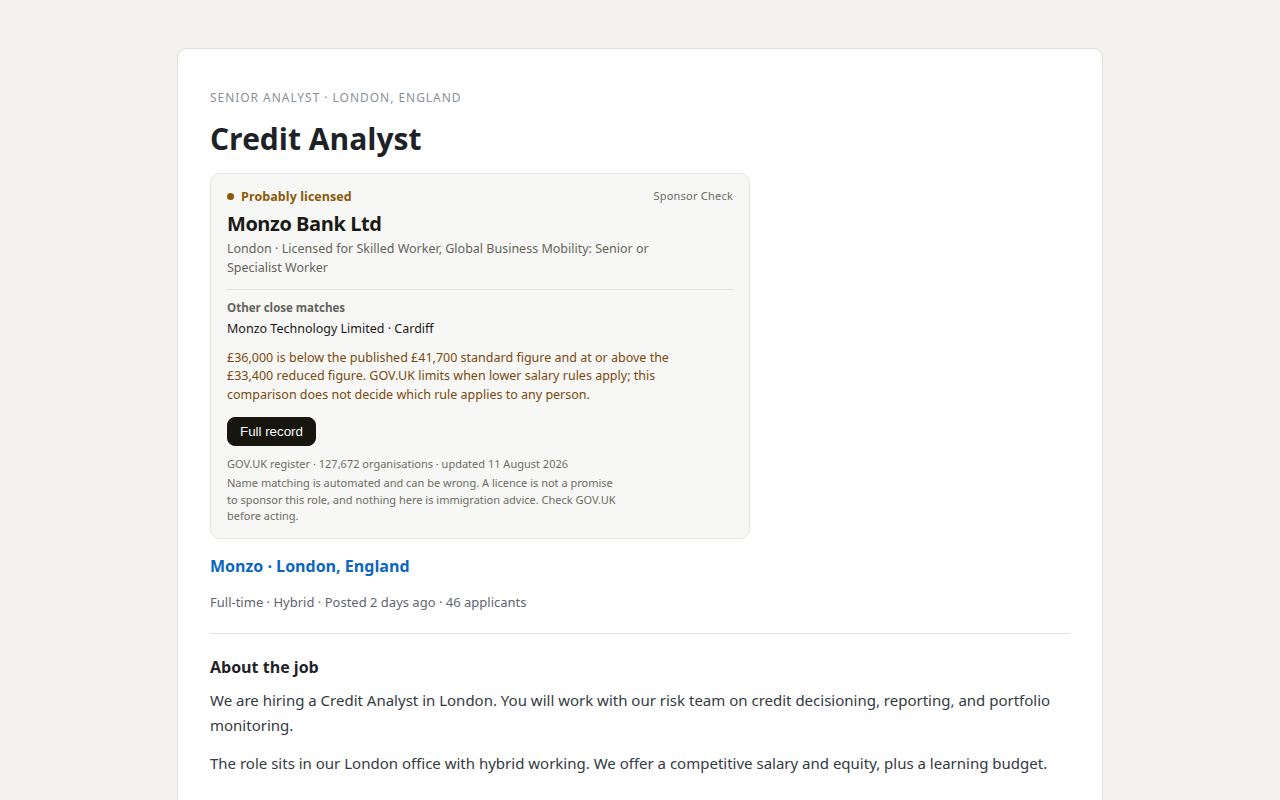
Our product. Sponsor Check is the browser extension sold by THINKINGAI LIMITED, the company identified in this site's footer. The register itself remains free, official, and public. This site is information only, not immigration advice.